
PostgreSQL High Availability with Patroni and etcd
📦 View Patroni on GitHub | 📦 View etcd on GitHub | 📖 Patroni Documentation
Executive Summary
Building a PostgreSQL high availability cluster requires careful planning, proper configuration, and thorough testing. This guide covers setting up a PostgreSQL HA cluster with Patroni and etcd, providing automatic failover, leader election, and zero-downtime operations. The guide includes architecture design, step-by-step installation, configuration tuning, failover scenarios, monitoring setup, and best practices.
What is High Availability and Why Do We Need It?
High Availability (HA) is a system design approach that ensures continuous operation and minimal downtime, even when individual components fail. In the context of databases, HA means the database remains accessible and operational 24/7, regardless of hardware failures, network issues, or maintenance requirements.
The Cost of Downtime
Database downtime causes immediate and long-term problems. Understanding these costs helps justify the investment in high availability infrastructure.
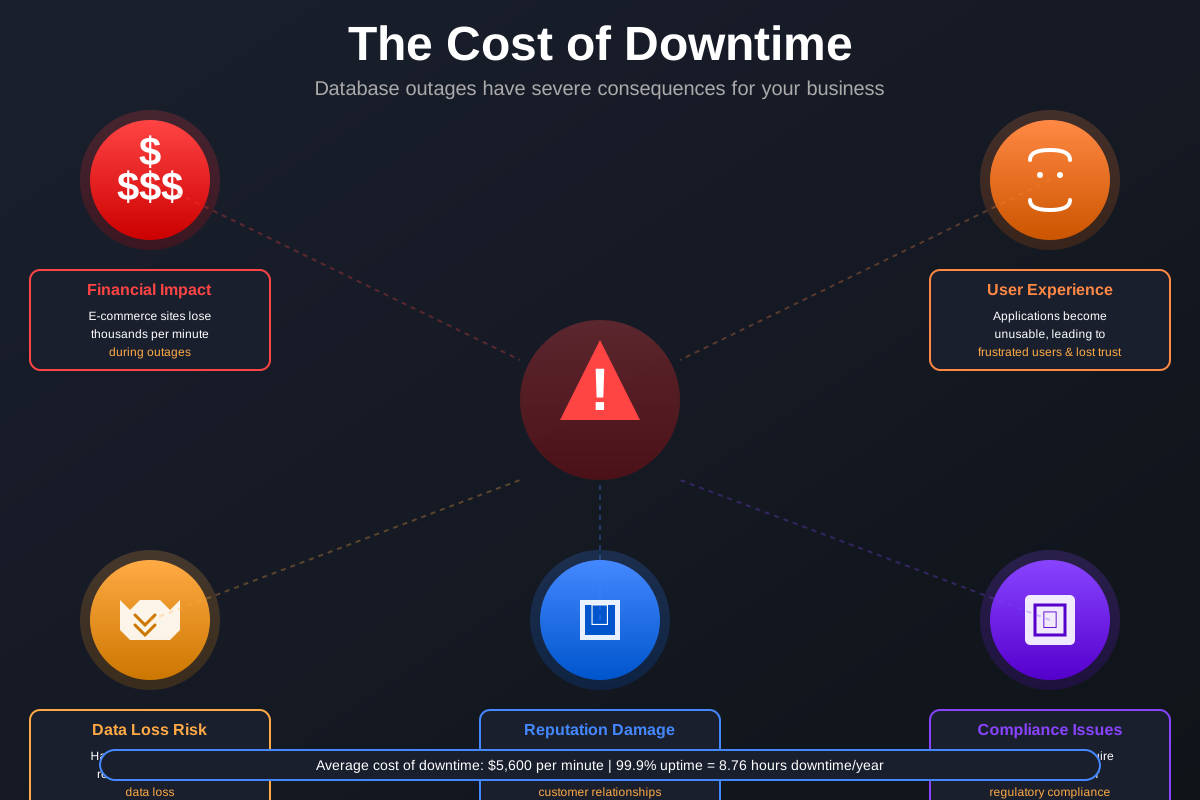
Figure: The Five Critical Costs of Database Downtime
Database downtime can have severe consequences:
- Financial Impact: E-commerce sites can lose thousands of dollars per minute during outages
- User Experience: Applications become unusable, leading to frustrated users and lost trust
- Data Loss Risk: Without proper replication, hardware failures can result in permanent data loss
- Compliance Issues: Many industries require 99.9%+ uptime for regulatory compliance
- Reputation Damage: Extended outages can damage brand reputation and customer relationships
Traditional Single-Node Limitations
A single PostgreSQL instance, while reliable, has critical limitations:
- Single Point of Failure: If the server crashes, the entire database becomes unavailable
- No Automatic Recovery: Manual intervention required for every failure
- Maintenance Windows: Updates and backups require planned downtime
- No Load Distribution: All queries hit a single server, limiting scalability
- Backup Dependency: Recovery depends entirely on backups, which may be hours or days old
High Availability Solutions
High Availability architectures solve these problems through:
- Redundancy: Multiple database nodes ensure service continues if one fails
- Automatic Failover: Systems automatically detect failures and switch to healthy nodes
- Zero-Downtime Operations: Maintenance can be performed without service interruption
- Load Distribution: Read queries can be distributed across multiple nodes
- Real-Time Replication: Data is continuously synchronized, minimizing data loss risk
Why This Architecture?
This HA cluster configuration works well for most environments because it provides:
- Quorum-Based Consensus: With three nodes, 2 out of 3 form a majority, preventing split-brain scenarios
- Cost-Performance Balance: More cost-effective than 5+ node clusters while providing redundancy
- Simplified Operations: Easier to manage than larger clusters while still providing HA
- Common Pattern: Configuration used by cloud providers
- Flexible Scaling: Can be expanded to 5+ nodes if needed without architectural changes
The Complete High Availability Flow
High availability systems follow a predictable sequence when handling failures. Understanding this flow helps configure the system correctly and troubleshoot issues.
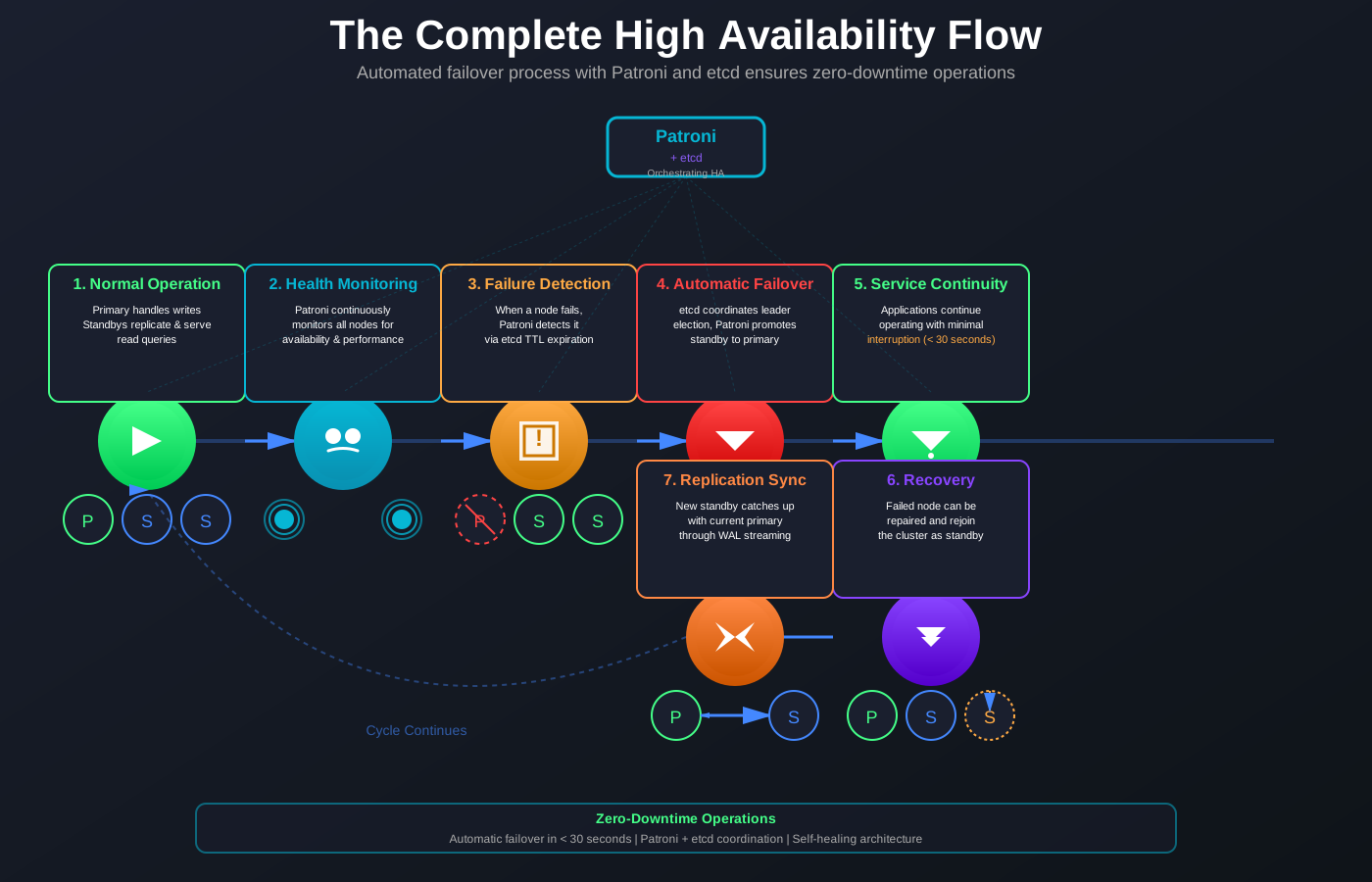
Figure: Seven-Step Automated HA Process
A properly configured HA system follows this flow:
- Normal Operation: Primary node handles all writes, standbys replicate data and serve reads
- Health Monitoring: Patroni continuously monitors all nodes for availability and performance
- Failure Detection: When a node fails, Patroni detects it within seconds through health checks
- Automatic Failover: System automatically promotes a standby to primary using etcd consensus
- Service Continuity: Applications continue operating with minimal interruption (typically < 30 seconds)
- Recovery: Failed node can be repaired and rejoin the cluster as a standby
- Replication Sync: New standby catches up with current primary through WAL streaming
This entire process happens automatically, without manual intervention, ensuring the database remains available even during failures.
Architecture Overview
A high availability cluster balances redundancy, performance, and operational complexity. This architecture offers several advantages.

Figure 1: Complete 3-Node High Availability Architecture
The architecture consists of three main components:
- etcd Cluster: Provides distributed consensus and leader election coordination
- Patroni Agents: Run on each PostgreSQL node, managing leader election and failover
- PostgreSQL Nodes: Three database nodes with streaming replication
Quorum-Based Operations
Three nodes create a quorum system. Any two nodes form a quorum, allowing the cluster to continue operating when one node fails. This provides:
- Automatic Failover: When the primary node fails, the remaining two nodes can elect a new primary
- Split-Brain Prevention: The quorum requirement prevents conflicting writes from multiple primaries
- Network Partition Tolerance: The majority partition continues serving requests
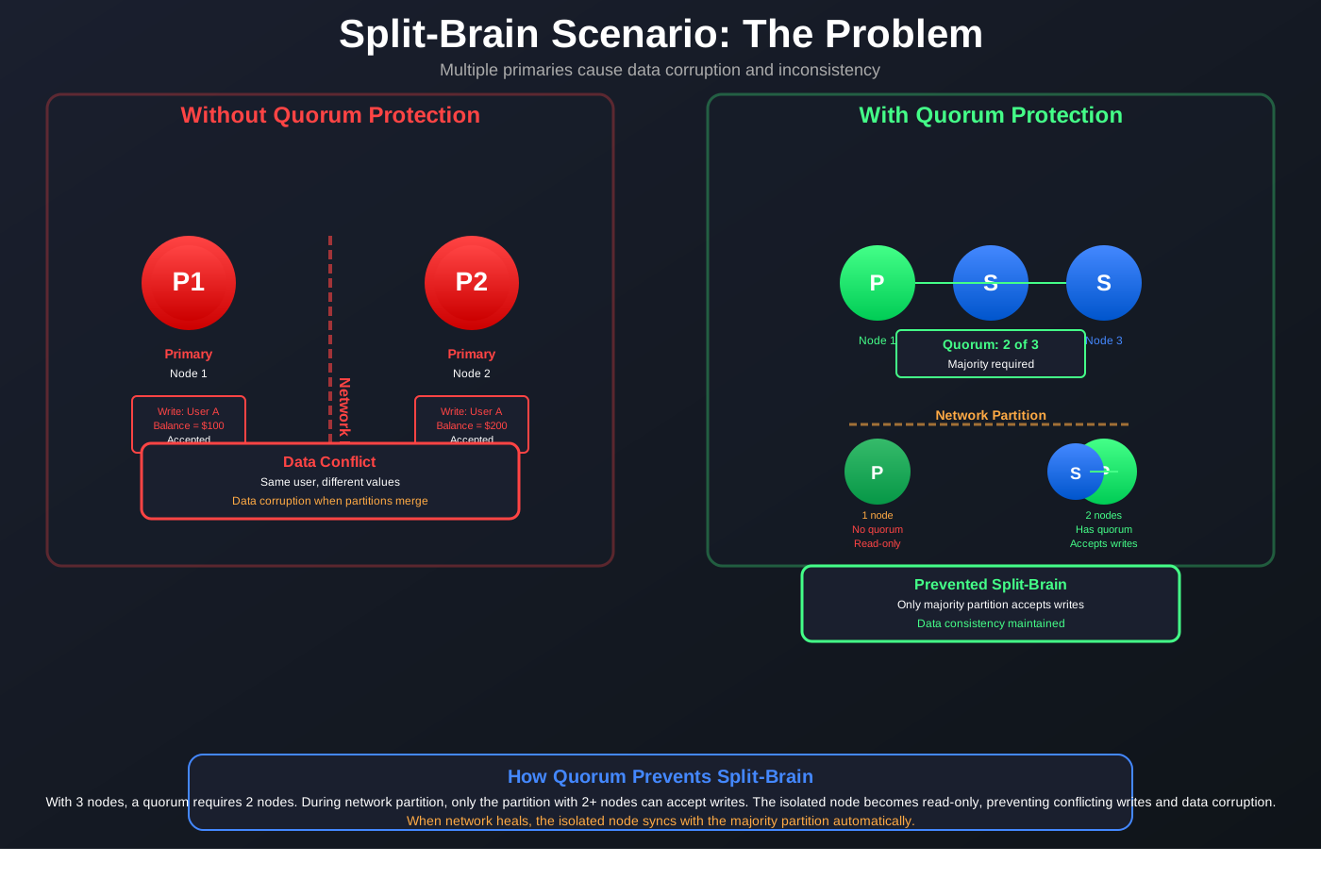
Figure: Split-Brain Problem and Quorum Solution
Split-brain occurs when network partitions create multiple primary nodes. Each primary accepts writes independently, causing data conflicts. Quorum-based consensus requires a majority of nodes to agree before accepting writes, preventing split-brain scenarios.
Performance Benefits
Three nodes enable:
- Read Scaling: Distribute read queries across all three nodes
- Load Distribution: Applications can connect directly to standby nodes for read queries
- Reduced Single Points of Failure: No single node failure can bring down the cluster
Operational Simplicity
Managing a high availability cluster requires balancing complexity with functionality. This configuration works well for most environments.
Compared to larger clusters (5+ nodes), a 3-node setup offers:
- Lower Resource Requirements: Fewer servers to provision and maintain
- Simpler Configuration: Less complex networking and coordination
- Easier Troubleshooting: Fewer moving parts to diagnose
Component Roles
Each component in the high availability architecture has specific responsibilities that work together to ensure continuous database availability. Understanding these roles is essential for proper configuration and troubleshooting.
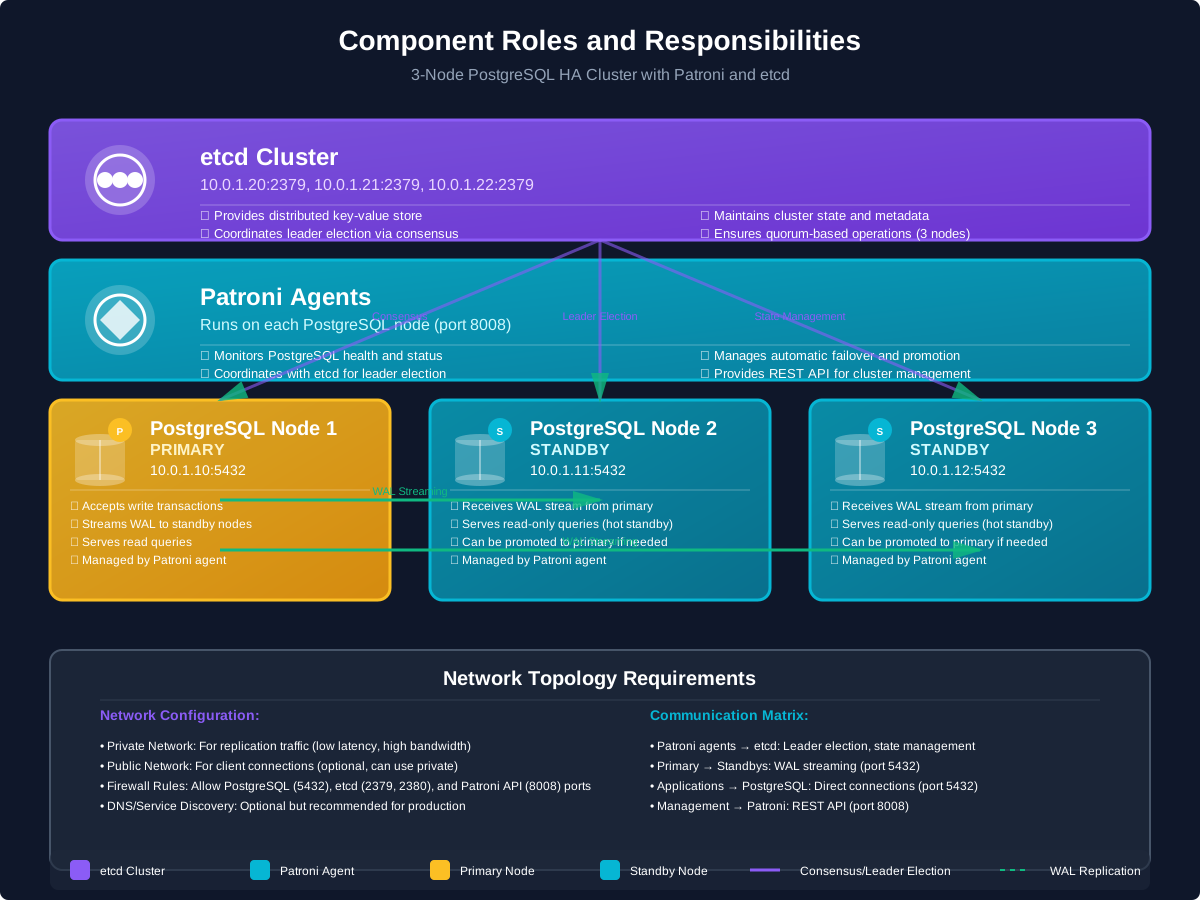
Figure 2: Component Roles and Responsibilities
etcd Cluster: Provides distributed key-value store for cluster state and leader election. The etcd cluster must have an odd number of nodes (3, 5, 7) to maintain quorum.
Patroni: Runs as an agent on each PostgreSQL node. Patroni monitors PostgreSQL health, coordinates with etcd for leader election, and manages automatic failover.
PostgreSQL Nodes: Database servers running streaming replication. One node acts as primary (accepts writes), others act as standbys (receive replication).
Network Topology
Proper network configuration is essential for high availability. The network topology determines how nodes communicate, how replication traffic flows, and how clients connect to the cluster.
All nodes must have:
- Private Network: For replication traffic (low latency, high bandwidth)
- Public Network: For client connections (optional, can use private)
- Firewall Rules: Allow PostgreSQL (5432), etcd (2379, 2380), and Patroni API (8008) ports
- DNS/Service Discovery: Optional but recommended for production
Prerequisites and System Requirements
Before beginning the setup, ensure the necessary hardware, software, and network infrastructure is in place. Proper preparation makes the installation process smoother and helps avoid common issues.
Software Requirements
Install the required software packages before starting the cluster setup. These packages provide the database server, development tools, and system utilities needed for the installation.
- Operating System: Linux (Ubuntu 22.04 LTS, RHEL 8+, or Debian 11+)
- PostgreSQL: Version 14, 15, 16, or 17 (Download PostgreSQL)
- Patroni: Latest release from GitHub or via pip
- etcd: Version 3.5+ from GitHub
- System Tools:
curl,wget,git,build-essential,python3,pip
Network Configuration
Network connectivity between all nodes is critical for replication and failover. Proper network configuration ensures low-latency replication and reliable health checks.
Ensure all nodes can communicate:
# From each node, test connectivity to othersping 10.0.1.10 # Node 1ping 10.0.1.11 # Node 2ping 10.0.1.12 # Node 3ping 10.0.1.20 # etcd Node 1ping 10.0.1.21 # etcd Node 2ping 10.0.1.22 # etcd Node 3# Test PostgreSQL portnc -zv 10.0.1.10 5432nc -zv 10.0.1.11 5432nc -zv 10.0.1.12 5432# Test etcd portsnc -zv 10.0.1.20 2379nc -zv 10.0.1.21 2379nc -zv 10.0.1.22 2379
User and Permissions
Setting up proper user accounts and permissions is a security best practice that also simplifies management. Dedicated users for different operations help with auditing and access control.
Create a dedicated user for PostgreSQL operations:
# On all PostgreSQL nodessudo useradd -r -s /bin/bash postgressudo mkdir -p /var/lib/postgresqlsudo chown postgres:postgres /var/lib/postgresql
Step 1: etcd Cluster Setup
The etcd cluster provides distributed consensus for leader election. Setting up etcd correctly is critical for reliable failover. This step installs and configures a 3-node etcd cluster.
Installing etcd
etcd must be installed on three dedicated nodes or co-located with PostgreSQL nodes. Use the official etcd releases for stability.
Download and install etcd:
# On all etcd nodesETCD_VER=v3.5.10curl -L https://github.com/etcd-io/etcd/releases/download/${ETCD_VER}/etcd-${ETCD_VER}-linux-amd64.tar.gz -o etcd-${ETCD_VER}-linux-amd64.tar.gztar xzvf etcd-${ETCD_VER}-linux-amd64.tar.gzsudo mv etcd-${ETCD_VER}-linux-amd64/etcd* /usr/local/bin/sudo chmod +x /usr/local/bin/etcd*
Configuring etcd Cluster
Each etcd node requires unique configuration with cluster member information. The cluster must know about all members to form quorum.
On etcd Node 1 (10.0.1.20):
# Create etcd usersudo useradd -r -s /bin/bash etcdsudo mkdir -p /var/lib/etcdsudo chown etcd:etcd /var/lib/etcd# Create systemd servicesudo nano /etc/systemd/system/etcd.service
Create /etc/systemd/system/etcd.service:
[Unit]Description=etcd - distributed key-value storeAfter=network.target[Service]Type=notifyUser=etcdGroup=etcdExecStart=/usr/local/bin/etcd \--name=etcd1 \--data-dir=/var/lib/etcd \--listen-client-urls=https://10.0.1.20:2379 \--advertise-client-urls=https://10.0.1.20:2379 \--listen-peer-urls=https://10.0.1.20:2380 \--initial-advertise-peer-urls=https://10.0.1.20:2380 \--initial-cluster=etcd1=https://10.0.1.20:2380,etcd2=https://10.0.1.21:2380,etcd3=https://10.0.1.22:2380 \--initial-cluster-token=etcd-cluster-1 \--initial-cluster-state=new \--client-cert-auth \--trusted-ca-file=/etc/etcd/ca.crt \--cert-file=/etc/etcd/etcd1.crt \--key-file=/etc/etcd/etcd1.key \--peer-client-cert-auth \--peer-trusted-ca-file=/etc/etcd/ca.crt \--peer-cert-file=/etc/etcd/etcd1.crt \--peer-key-file=/etc/etcd/etcd1.keyRestart=on-failureRestartSec=5LimitNOFILE=65536[Install]WantedBy=multi-user.target
On etcd Node 2 (10.0.1.21):
[Unit]Description=etcd - distributed key-value storeAfter=network.target[Service]Type=notifyUser=etcdGroup=etcdExecStart=/usr/local/bin/etcd \--name=etcd2 \--data-dir=/var/lib/etcd \--listen-client-urls=https://10.0.1.21:2379 \--advertise-client-urls=https://10.0.1.21:2379 \--listen-peer-urls=https://10.0.1.21:2380 \--initial-advertise-peer-urls=https://10.0.1.21:2380 \--initial-cluster=etcd1=https://10.0.1.20:2380,etcd2=https://10.0.1.21:2380,etcd3=https://10.0.1.22:2380 \--initial-cluster-token=etcd-cluster-1 \--initial-cluster-state=new \--client-cert-auth \--trusted-ca-file=/etc/etcd/ca.crt \--cert-file=/etc/etcd/etcd2.crt \--key-file=/etc/etcd/etcd2.key \--peer-client-cert-auth \--peer-trusted-ca-file=/etc/etcd/ca.crt \--peer-cert-file=/etc/etcd/etcd2.crt \--peer-key-file=/etc/etcd/etcd2.keyRestart=on-failureRestartSec=5LimitNOFILE=65536[Install]WantedBy=multi-user.target
On etcd Node 3 (10.0.1.22):
[Unit]Description=etcd - distributed key-value storeAfter=network.target[Service]Type=notifyUser=etcdGroup=etcdExecStart=/usr/local/bin/etcd \--name=etcd3 \--data-dir=/var/lib/etcd \--listen-client-urls=https://10.0.1.22:2379 \--advertise-client-urls=https://10.0.1.22:2379 \--listen-peer-urls=https://10.0.1.22:2380 \--initial-advertise-peer-urls=https://10.0.1.22:2380 \--initial-cluster=etcd1=https://10.0.1.20:2380,etcd2=https://10.0.1.21:2380,etcd3=https://10.0.1.22:2380 \--initial-cluster-token=etcd-cluster-1 \--initial-cluster-state=new \--client-cert-auth \--trusted-ca-file=/etc/etcd/ca.crt \--cert-file=/etc/etcd/etcd3.crt \--key-file=/etc/etcd/etcd3.key \--peer-client-cert-auth \--peer-trusted-ca-file=/etc/etcd/ca.crt \--peer-cert-file=/etc/etcd/etcd3.crt \--peer-key-file=/etc/etcd/etcd3.keyRestart=on-failureRestartSec=5LimitNOFILE=65536[Install]WantedBy=multi-user.target
Generating TLS Certificates for etcd
etcd requires TLS certificates for secure communication. Generate certificates for all etcd nodes and the CA.
# Create CAopenssl genrsa -out ca.key 2048openssl req -new -x509 -days 3650 -key ca.key -out ca.crt -subj "/CN=etcd-ca"# Create certificates for each etcd nodefor i in 1 2 3; doopenssl genrsa -out etcd${i}.key 2048openssl req -new -key etcd${i}.key -out etcd${i}.csr -subj "/CN=etcd${i}"openssl x509 -req -days 3650 -in etcd${i}.csr -CA ca.crt -CAkey ca.key -out etcd${i}.crt -extensions v3_req -extfile <(echo -e "[v3_req]subjectAltName=IP:10.0.1.2${i}")done# Copy certificates to each nodesudo mkdir -p /etc/etcdsudo cp ca.crt /etc/etcd/sudo cp etcd1.* /etc/etcd/ # On node 1sudo cp etcd2.* /etc/etcd/ # On node 2sudo cp etcd3.* /etc/etcd/ # On node 3sudo chown -R etcd:etcd /etc/etcdsudo chmod 600 /etc/etcd/*.key
Starting etcd Cluster
Start all etcd nodes simultaneously to form the cluster. The cluster requires a majority of nodes to be available.
# On all etcd nodessudo systemctl daemon-reloadsudo systemctl enable etcdsudo systemctl start etcdsudo systemctl status etcd
Verifying etcd Cluster
Verify the etcd cluster is healthy and all members are connected.
# Check cluster healthETCDCTL_API=3 /usr/local/bin/etcdctl --endpoints=https://10.0.1.20:2379,https://10.0.1.21:2379,https://10.0.1.22:2379 \--cacert=/etc/etcd/ca.crt \--cert=/etc/etcd/etcd1.crt \--key=/etc/etcd/etcd1.key \endpoint health# Check cluster membersETCDCTL_API=3 /usr/local/bin/etcdctl --endpoints=https://10.0.1.20:2379,https://10.0.1.21:2379,https://10.0.1.22:2379 \--cacert=/etc/etcd/ca.crt \--cert=/etc/etcd/etcd1.crt \--key=/etc/etcd/etcd1.key \member list
Step 2: PostgreSQL Installation and Configuration
The first step in building a high availability cluster is installing and configuring PostgreSQL on all database nodes. This involves setting up the database software, configuring replication parameters, and preparing the nodes for cluster membership.
Installing PostgreSQL
PostgreSQL must be installed on all three database nodes. Use the official PostgreSQL repository to ensure the latest stable version.
On Ubuntu/Debian:
# Add PostgreSQL APT repositorysudo apt updatesudo apt install -y postgresql-commonsudo /usr/share/postgresql-common/pgdg/apt.postgresql.org.sh# Install PostgreSQL 16 (or preferred version)sudo apt install -y postgresql-16 postgresql-contrib-16
On RHEL/CentOS:
# Install PostgreSQL repositorysudo dnf install -y https://download.postgresql.org/pub/repos/yum/reporpms/EL-8-x86_64/pgdg-redhat-repo-latest.noarch.rpm# Install PostgreSQL 16sudo dnf install -y postgresql16-server postgresql16-contrib
Configuring PostgreSQL for Replication
PostgreSQL must be configured to enable replication before standby nodes can connect. This involves setting WAL level, replication slots, and connection permissions.
Edit postgresql.conf on all nodes:
sudo -u postgres nano /var/lib/postgresql/16/main/postgresql.conf
Add or modify these settings:
# Network Configurationlisten_addresses = '*'port = 5432max_connections = 200# Replication Settingswal_level = replicamax_wal_senders = 10max_replication_slots = 10hot_standby = onhot_standby_feedback = on# Performance Settingsshared_buffers = 4GBeffective_cache_size = 12GBmaintenance_work_mem = 1GBcheckpoint_completion_target = 0.9wal_buffers = 16MBdefault_statistics_target = 100random_page_cost = 1.1effective_io_concurrency = 200work_mem = 20MBmin_wal_size = 1GBmax_wal_size = 4GB# Logginglogging_collector = onlog_directory = 'log'log_filename = 'postgresql-%Y-%m-%d_%H%M%S.log'log_rotation_age = 1dlog_rotation_size = 100MBlog_line_prefix = '%t [%p]: [%l-1] user=%u,db=%d,app=%a,client=%h 'log_checkpoints = onlog_connections = onlog_disconnections = onlog_lock_waits = onlog_temp_files = 0log_autovacuum_min_duration = 0log_error_verbosity = default
Edit pg_hba.conf on all nodes:
sudo -u postgres nano /var/lib/postgresql/16/main/pg_hba.conf
Add replication and connection rules:
# TYPE DATABASE USER ADDRESS METHOD# Local connectionslocal all postgres peerlocal all all md5# IPv4 local connectionshost all all 127.0.0.1/32 md5host all all 10.0.1.0/24 md5# Replication connectionshost replication replicator 10.0.1.0/24 md5
Create replication user:
# On primary node (will be managed by Patroni later)sudo -u postgres psql -c "CREATE USER replicator WITH REPLICATION PASSWORD 'secure_replication_password';"
Understanding Replication Flow
Streaming replication sends Write-Ahead Log data from the primary to standby nodes in real-time. This keeps all nodes synchronized with minimal delay.
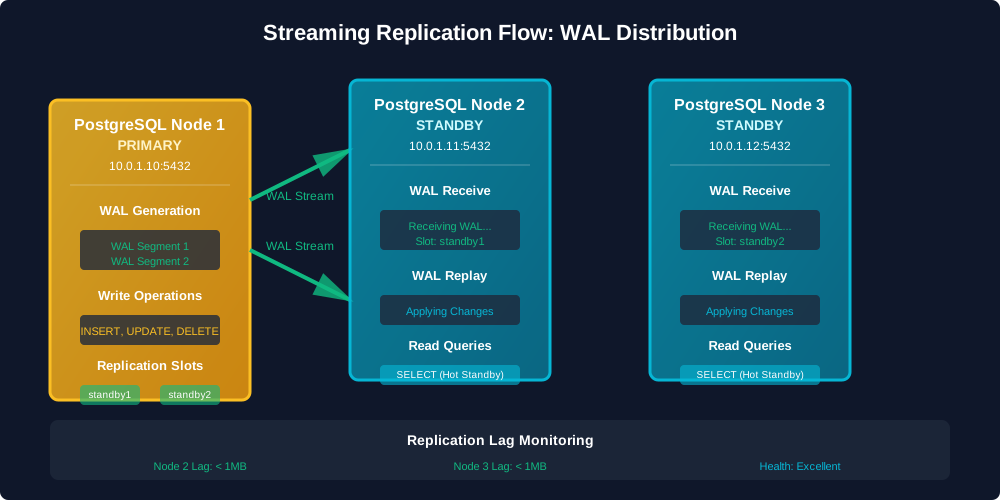
Figure 2: WAL Streaming Replication Flow
The diagram above shows how Write-Ahead Log (WAL) data flows from the primary node to both standby nodes:
- Primary Node (Node 1) generates WAL segments as transactions are committed
- WAL Streaming sends these segments to both standby nodes in real-time
- Standby Nodes receive and replay WAL, keeping data synchronized
- Read Queries can be served from standby nodes (hot standby mode)
- Replication Slots ensure WAL is retained until standby nodes have received it
Step 3: Patroni Installation
Patroni serves as the leader election and failover manager for the cluster. Installing and configuring Patroni correctly is crucial for achieving high availability.
Installing Dependencies
Patroni requires Python 3 and several Python packages. Install these packages before installing Patroni.
On all PostgreSQL nodes:
# Ubuntu/Debiansudo apt updatesudo apt install -y python3 python3-pip python3-dev libpq-dev# RHEL/CentOSsudo dnf install -y python3 python3-pip python3-devel postgresql16-devel
Installing Patroni
Install Patroni using pip. Use a virtual environment for isolation.
# Create virtual environmentsudo -u postgres python3 -m venv /opt/patronisudo -u postgres /opt/patroni/bin/pip install --upgrade pipsudo -u postgres /opt/patroni/bin/pip install patroni[etcd] psycopg2-binary# Create symlink for easy accesssudo ln -s /opt/patroni/bin/patroni /usr/local/bin/patroni
Step 4: Patroni Configuration
Proper configuration of Patroni ensures reliable leader election, automatic failover, and cluster management. This step creates the configuration files that define how Patroni manages the cluster.
Creating Patroni Configuration File
The configuration file defines how Patroni connects to etcd, manages PostgreSQL, and handles failover. Use YAML format for readability.
Create /etc/patroni/postgresql.yml on Node 1:
scope: postgresnamespace: /db/name: postgresql-node1restapi:listen: 10.0.1.10:8008connect_address: 10.0.1.10:8008etcd:hosts: 10.0.1.20:2379,10.0.1.21:2379,10.0.1.22:2379protocol: httpscacert: /etc/patroni/etcd-ca.crtcert: /etc/patroni/etcd-client.crtkey: /etc/patroni/etcd-client.keybootstrap:dcs:ttl: 30loop_wait: 10retry_timeout: 30maximum_lag_on_failover: 1048576postgresql:use_pg_rewind: trueuse_slots: trueparameters:wal_level: replicahot_standby: "on"wal_keep_segments: 8max_wal_senders: 10max_replication_slots: 10wal_log_hints: "on"initdb:- encoding: UTF8- data-checksumspg_hba:- host replication replicator 10.0.1.0/24 md5- host all all 10.0.1.0/24 md5users:replicator:password: secure_replication_passwordoptions:- replicationpostgresql:listen: 10.0.1.10:5432connect_address: 10.0.1.10:5432data_dir: /var/lib/postgresql/16/mainbin_dir: /usr/lib/postgresql/16/binpgpass: /var/lib/postgresql/.pgpassparameters:max_connections: 200max_locks_per_transaction: 64max_worker_processes: 8wal_level: replicahot_standby: "on"wal_keep_segments: 8max_wal_senders: 10max_replication_slots: 10wal_log_hints: "on"shared_buffers: 4GBeffective_cache_size: 12GBmaintenance_work_mem: 1GBcheckpoint_completion_target: 0.9wal_buffers: 16MBdefault_statistics_target: 100random_page_cost: 1.1effective_io_concurrency: 200work_mem: 20MBmin_wal_size: 1GBmax_wal_size: 4GBtags:nofailover: falsenoloadbalance: falseclonefrom: falsenosync: false
Create /etc/patroni/postgresql.yml on Node 2:
scope: postgresnamespace: /db/name: postgresql-node2restapi:listen: 10.0.1.11:8008connect_address: 10.0.1.11:8008etcd:hosts: 10.0.1.20:2379,10.0.1.21:2379,10.0.1.22:2379protocol: httpscacert: /etc/patroni/etcd-ca.crtcert: /etc/patroni/etcd-client.crtkey: /etc/patroni/etcd-client.keypostgresql:listen: 10.0.1.11:5432connect_address: 10.0.1.11:5432data_dir: /var/lib/postgresql/16/mainbin_dir: /usr/lib/postgresql/16/binpgpass: /var/lib/postgresql/.pgpasstags:nofailover: falsenoloadbalance: falseclonefrom: falsenosync: false
Create /etc/patroni/postgresql.yml on Node 3:
scope: postgresnamespace: /db/name: postgresql-node3restapi:listen: 10.0.1.12:8008connect_address: 10.0.1.12:8008etcd:hosts: 10.0.1.20:2379,10.0.1.21:2379,10.0.1.22:2379protocol: httpscacert: /etc/patroni/etcd-ca.crtcert: /etc/patroni/etcd-client.crtkey: /etc/patroni/etcd-client.keypostgresql:listen: 10.0.1.12:5432connect_address: 10.0.1.12:5432data_dir: /var/lib/postgresql/16/mainbin_dir: /usr/lib/postgresql/16/binpgpass: /var/lib/postgresql/.pgpasstags:nofailover: falsenoloadbalance: falseclonefrom: falsenosync: false
Copying etcd Certificates
Patroni needs etcd client certificates to connect to the etcd cluster. Copy the CA certificate and create client certificates.
# Copy CA certificatesudo cp /etc/etcd/ca.crt /etc/patroni/etcd-ca.crt# Create client certificate for Patroniopenssl genrsa -out patroni-client.key 2048openssl req -new -key patroni-client.key -out patroni-client.csr -subj "/CN=patroni-client"openssl x509 -req -days 3650 -in patroni-client.csr -CA /etc/etcd/ca.crt -CAkey /etc/etcd/ca.key -out patroni-client.crt# Copy to all PostgreSQL nodessudo cp patroni-client.crt /etc/patroni/etcd-client.crtsudo cp patroni-client.key /etc/patroni/etcd-client.keysudo chown -R postgres:postgres /etc/patronisudo chmod 600 /etc/patroni/etcd-client.key
Creating Systemd Service
A systemd service ensures Patroni starts automatically on boot and can be managed with standard systemctl commands. This provides reliable service management.
Create /etc/systemd/system/patroni.service on all nodes:
[Unit]Description=Patroni - PostgreSQL High Availability ManagerAfter=network.target etcd.serviceWants=etcd.service[Service]Type=simpleUser=postgresGroup=postgresExecStart=/usr/local/bin/patroni /etc/patroni/postgresql.ymlExecReload=/bin/kill -s HUP $MAINPIDKillMode=processRestart=on-failureRestartSec=10sTimeoutStopSec=30s[Install]WantedBy=multi-user.target
Enable and start Patroni:
# On Node 1 (primary)sudo systemctl daemon-reloadsudo systemctl enable patronisudo systemctl start patronisudo systemctl status patroni# On Node 2 and Node 3 (standbys)sudo systemctl daemon-reloadsudo systemctl enable patronisudo systemctl start patroni
Verifying Patroni Cluster
After starting Patroni, verify it is running correctly and can connect to etcd. Check logs for any connection errors.
Check Patroni status:
# Check service statussudo systemctl status patroni# Check Patroni REST APIcurl http://10.0.1.10:8008/patronicurl http://10.0.1.11:8008/patronicurl http://10.0.1.12:8008/patroni# Check cluster statuscurl http://10.0.1.10:8008/cluster
Verify leader election:
# Check which node is leadercurl http://10.0.1.10:8008/patroni | jq .rolecurl http://10.0.1.11:8008/patroni | jq .rolecurl http://10.0.1.12:8008/patroni | jq .role# One should return "Leader", others "Replica"
Step 5: Testing Failover Scenarios
Thorough testing of failover scenarios is essential before deploying to production. Understanding how the system behaves during different failure modes helps ensure reliability and prepares teams for real-world incidents. The following diagram illustrates a complete failover sequence:
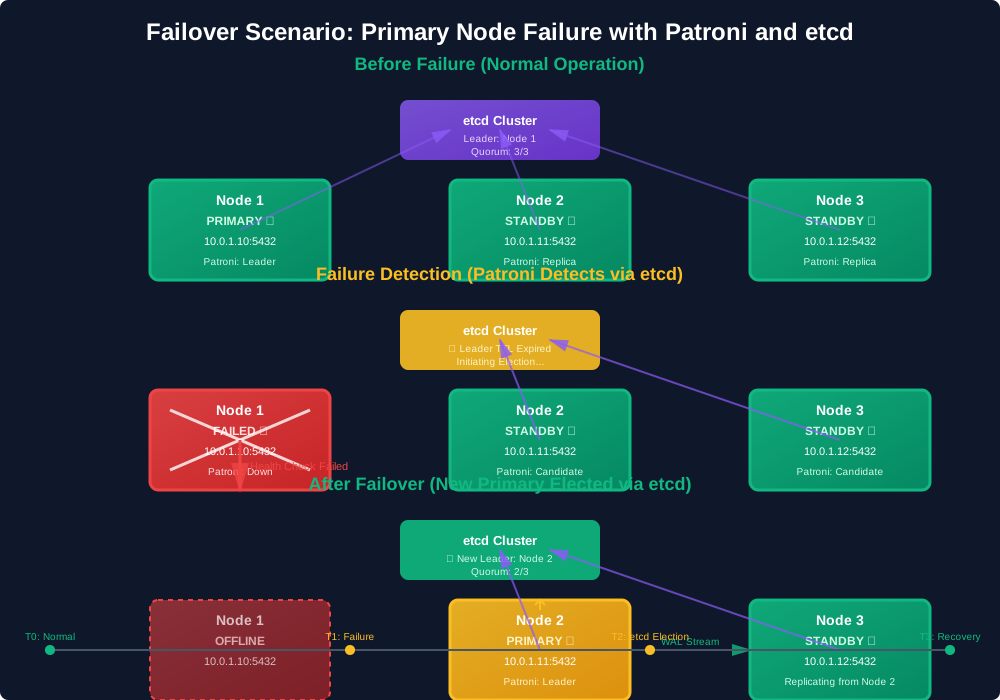
Figure 3: Complete Failover Sequence
The diagram shows three stages:
- Before Failure: Normal operation with all nodes healthy
- Failure Detection: Patroni detects primary node failure through etcd
- After Failover: New primary elected and cluster restored
Test 1: Primary Node Failure
Testing primary node failure verifies that the cluster can detect the failure and promote a standby node automatically. This is the most critical failover scenario.
Simulate primary failure:
# On primary nodesudo systemctl stop patroni
Monitor failover:
# Watch Patroni logs on standby nodessudo journalctl -u patroni -f# Check cluster statuscurl http://10.0.1.11:8008/cluster | jq .
Verify new primary:
# Check which node is now leadercurl http://10.0.1.11:8008/patroni | jq .rolecurl http://10.0.1.12:8008/patroni | jq .role# Test writes on new primarypsql -h 10.0.1.11 -U postgres -d postgres -c "CREATE TABLE IF NOT EXISTS failover_test (id SERIAL PRIMARY KEY, data TEXT);"psql -h 10.0.1.11 -U postgres -d postgres -c "INSERT INTO failover_test (data) VALUES ('Failover test successful');"
Test 2: Standby Node Failure
Standby node failures should not affect cluster operations. The cluster continues serving requests using the remaining nodes. This test confirms graceful degradation.
Simulate standby failure:
# On a standby nodesudo systemctl stop patroni
Verify cluster continues operating:
# Writes should still workpsql -h 10.0.1.10 -U postgres -d postgres -c "INSERT INTO failover_test (data) VALUES ('Standby failure test');"# Reads should still workpsql -h 10.0.1.10 -U postgres -d postgres -c "SELECT COUNT(*) FROM failover_test;"
Test 3: Network Partition
Network partitions can split the cluster into isolated groups. Quorum-based systems ensure only the majority partition accepts writes, preventing split-brain scenarios.
Simulate network partition:
# Block traffic to Node 1sudo iptables -A INPUT -s 10.0.1.10 -j DROPsudo iptables -A OUTPUT -d 10.0.1.10 -j DROP
Verify cluster behavior:
# Patroni should detect failure and elect new leadercurl http://10.0.1.11:8008/cluster | jq .# Check which node is now leadercurl http://10.0.1.11:8008/patroni | jq .role
Restore connectivity:
sudo iptables -D INPUT -s 10.0.1.10 -j DROPsudo iptables -D OUTPUT -d 10.0.1.10 -j DROP
Test 4: etcd Node Failure
etcd cluster can tolerate the failure of one node (out of three). If two etcd nodes fail, the cluster loses quorum and Patroni cannot elect a leader.
Simulate etcd failure:
# Stop one etcd nodesudo systemctl stop etcd # On etcd node 1
Verify cluster continues operating:
# Cluster should continue operating with 2 etcd nodescurl http://10.0.1.10:8008/cluster | jq .# Restart etcd nodesudo systemctl start etcd
Test 5: Complete Failover and Recovery
A complete failover test simulates the full cycle: primary failure, standby promotion, service continuation, and recovery of the failed node. This validates the entire high availability process.
Full failover test:
# 1. Stop primarysudo systemctl stop patroni # On Node 1# 2. Wait for failover (30-60 seconds)sleep 60# 3. Verify new primarycurl http://10.0.1.11:8008/cluster | jq .psql -h 10.0.1.11 -U postgres -d postgres -c "SELECT inet_server_addr(), pg_is_in_recovery();"# 4. Restore old primary as standbysudo systemctl start patroni # On Node 1# Patroni will automatically rejoin as standby# 5. Verify cluster is healthycurl http://10.0.1.11:8008/cluster | jq .
Step 6: Monitoring and Observability
Effective monitoring and observability are critical for maintaining a healthy high availability cluster. Without proper monitoring, issues may go undetected and problems become difficult to diagnose. This section covers the essential monitoring tools and techniques.
Patroni REST API Monitoring
Patroni exposes a REST API that provides real-time status information about the cluster. Enable this API to integrate with monitoring systems or check status programmatically.
Key endpoints:
# Cluster statuscurl http://10.0.1.10:8008/cluster# Individual node statuscurl http://10.0.1.10:8008/patronicurl http://10.0.1.11:8008/patronicurl http://10.0.1.12:8008/patroni# Leader informationcurl http://10.0.1.10:8008/leader# History of leader changescurl http://10.0.1.10:8008/history
PostgreSQL Monitoring Queries
PostgreSQL provides system views and functions that show replication status, lag, and node health. Regular queries help identify issues before they cause problems.
Replication status:
# On primarysudo -u postgres psql -c "SELECT pid, usename, application_name, client_addr, state, sync_state, sync_priority, pg_wal_lsn_diff(pg_current_wal_lsn(), sent_lsn) AS sent_lag, pg_wal_lsn_diff(sent_lsn, write_lsn) AS write_lag, pg_wal_lsn_diff(write_lsn, flush_lsn) AS flush_lag, pg_wal_lsn_diff(flush_lsn, replay_lsn) AS replay_lag FROM pg_stat_replication;"
Replication slots:
sudo -u postgres psql -c "SELECT slot_name, slot_type, database, active, pg_wal_lsn_diff(pg_current_wal_lsn(), restart_lsn) AS lag_bytes FROM pg_replication_slots;"
On standby nodes:
# Check if in recoverysudo -u postgres psql -c "SELECT pg_is_in_recovery();"# Check replication lagsudo -u postgres psql -c "SELECT pg_last_wal_receive_lsn(), pg_last_wal_replay_lsn(), pg_wal_lsn_diff(pg_last_wal_receive_lsn(), pg_last_wal_replay_lsn()) AS replay_lag_bytes;"
etcd Monitoring
Monitor etcd cluster health to ensure leader election continues working. etcd provides metrics and health endpoints.
# Check etcd cluster healthETCDCTL_API=3 /usr/local/bin/etcdctl --endpoints=https://10.0.1.20:2379,https://10.0.1.21:2379,https://10.0.1.22:2379 \--cacert=/etc/etcd/ca.crt \--cert=/etc/etcd/etcd1.crt \--key=/etc/etcd/etcd1.key \endpoint health# Check etcd metricscurl https://10.0.1.20:2379/metrics --cacert /etc/etcd/ca.crt --cert /etc/etcd/etcd1.crt --key /etc/etcd/etcd1.key
Setting Up Prometheus Monitoring
Prometheus provides time-series monitoring and alerting. Configure Prometheus to scrape metrics from Patroni and PostgreSQL nodes for centralized monitoring.
Install Prometheus exporter (if available) or use custom metrics:
# prometheus.ymlscrape_configs:- job_name: 'patroni'static_configs:- targets: ['10.0.1.10:8008', '10.0.1.11:8008', '10.0.1.12:8008']- job_name: 'postgresql'static_configs:- targets: ['10.0.1.10:9187', '10.0.1.11:9187', '10.0.1.12:9187']- job_name: 'etcd'static_configs:- targets: ['10.0.1.20:2379', '10.0.1.21:2379', '10.0.1.22:2379']
Log Monitoring
Log files grow over time and can fill disk space. Configure log rotation to automatically archive and remove old logs while keeping recent logs for troubleshooting.
Set up log rotation:
# /etc/logrotate.d/patroni/var/log/postgresql/*.log {dailyrotate 30compressdelaycompressmissingoknotifemptycreate 0640 postgres postgressharedscriptspostrotatesystemctl reload patroni > /dev/null 2>&1 || trueendscript}
Production Best Practices
Following best practices is crucial for maintaining a stable, secure, and performant high availability cluster in production. These recommendations are based on real-world experience and industry standards.
Security Hardening
Security measures protect the cluster from unauthorized access and data breaches. Implement these practices before deploying to any environment with sensitive data.
- Use Strong Passwords: Generate secure passwords for all database users
- Encrypt Connections: Enable SSL/TLS for PostgreSQL connections
- Firewall Rules: Restrict access to PostgreSQL, Patroni API, and etcd ports
- Network Isolation: Use private networks for replication traffic
- Regular Updates: Keep PostgreSQL, Patroni, and etcd updated
SSL/TLS Configuration
SSL/TLS encryption protects data in transit between clients and the database cluster. Generate certificates and configure PostgreSQL to require encrypted connections.
On all PostgreSQL nodes, edit postgresql.conf:
ssl = onssl_cert_file = '/var/lib/postgresql/16/main/server.crt'ssl_key_file = '/var/lib/postgresql/16/main/server.key'ssl_ca_file = '/var/lib/postgresql/16/main/ca.crt'
Generate certificates:
# Create CAopenssl req -new -x509 -days 3650 -nodes -out ca.crt -keyout ca.key# Create server certificateopenssl req -new -nodes -out server.csr -keyout server.keyopenssl x509 -req -in server.csr -days 3650 -CA ca.crt -CAkey ca.key -out server.crt# Set permissionschmod 600 server.keychown postgres:postgres server.* ca.*
Backup Strategy
Regular backups provide protection against data loss from corruption, accidental deletion, or catastrophic failures. Automate backups to ensure consistency and reduce manual work.
Automated backups:
#!/bin/bash# /usr/local/bin/pg_backup.shBACKUP_DIR="/var/backups/postgresql"DATE=$(date +%Y%m%d_%H%M%S)RETENTION_DAYS=30# Get primary node from PatroniPRIMARY=$(curl -s http://10.0.1.10:8008/cluster | jq -r '.members[] | select(.role=="Leader") | .name' | sed 's/postgresql-//')# Perform backuppg_basebackup -h 10.0.1.${PRIMARY: -1} -D "$BACKUP_DIR/backup_$DATE" -U replicator -v -P -Ft -z -X stream# Clean old backupsfind "$BACKUP_DIR" -type d -mtime +$RETENTION_DAYS -exec rm -rf {} +
Schedule with cron:
# Add to crontab0 2 * * * /usr/local/bin/pg_backup.sh
Performance Optimization
Performance tuning improves query response times and system throughput. Adjust configuration parameters based on workload patterns and available resources.
- Connection Management: Tune
max_connectionsbased on workload - Query Routing: Applications can connect directly to standby nodes for read queries
- Monitoring: Track query performance and adjust accordingly
- Indexing: Ensure proper indexes on frequently queried columns
- Vacuum: Schedule regular VACUUM and ANALYZE operations
Disaster Recovery Planning
Disaster recovery procedures ensure the team can restore service quickly after major failures. Document step-by-step recovery procedures and test them regularly.
- Document Procedures: Maintain runbooks for common failure scenarios
- Regular Testing: Test failover procedures monthly
- Backup Verification: Regularly test backup restoration
- Monitoring Alerts: Set up alerts for critical failures
- Recovery Time Objectives: Define and test RTO/RPO requirements
Troubleshooting Common Issues
Common issues can occur during cluster operation. This section describes symptoms, diagnostic steps, and solutions for typical problems.
Issue 1: Replication Lag
Replication lag occurs when standby nodes cannot keep up with the primary node's write rate. High lag increases data loss risk during failover.
Symptoms:
- Standby nodes falling behind primary
- Large replication lag values
Diagnosis:
# Check replication lagsudo -u postgres psql -c "SELECT application_name, pg_wal_lsn_diff(pg_current_wal_lsn(), replay_lsn) AS lag_bytes FROM pg_stat_replication;"
Solutions:
-
Increase WAL sender processes:
max_wal_senders = 10 -
Tune WAL settings:
wal_buffers = 16MBmax_wal_size = 4GB -
Check network bandwidth between nodes
Issue 2: Patroni Cannot Connect to etcd
If Patroni cannot connect to etcd, leader election fails and the cluster cannot function.
Symptoms:
- Patroni logs show connection errors
- No leader elected
- Cluster status shows errors
Diagnosis:
# Check Patroni logssudo journalctl -u patroni -n 100# Test etcd connectivityETCDCTL_API=3 /usr/local/bin/etcdctl --endpoints=https://10.0.1.20:2379 \--cacert=/etc/patroni/etcd-ca.crt \--cert=/etc/patroni/etcd-client.crt \--key=/etc/patroni/etcd-client.key \endpoint health
Solutions:
- Verify etcd cluster is running
- Check certificate paths and permissions
- Verify network connectivity
- Check firewall rules
Issue 3: Leader Election Failing
Leader election may fail if Patroni cannot communicate with etcd or if the etcd cluster loses quorum. This prevents automatic failover.
Symptoms:
- No leader elected
- Patroni logs show etcd connection errors
- Cluster status shows all nodes as unknown
Diagnosis:
# Check Patroni logssudo journalctl -u patroni -n 100# Check etcd cluster healthETCDCTL_API=3 /usr/local/bin/etcdctl --endpoints=https://10.0.1.20:2379,https://10.0.1.21:2379,https://10.0.1.22:2379 \--cacert=/etc/etcd/ca.crt \--cert=/etc/etcd/etcd1.crt \--key=/etc/etcd/etcd1.key \endpoint health
Solutions:
- Verify etcd cluster has quorum (2 out of 3 nodes)
- Check certificate paths and permissions
- Verify network connectivity between Patroni and etcd
- Check firewall rules
Issue 4: Split-Brain Scenario
Split-brain occurs when network partitions cause multiple nodes to act as primary simultaneously. Each primary accepts writes independently, creating data conflicts and corruption.
Symptoms:
- Multiple nodes acting as primary
- Data inconsistency across nodes
- Conflicting write operations
Prevention:
- Use quorum-based failover (3+ nodes)
- Configure proper fencing mechanisms
- Ensure etcd cluster has quorum
Recovery:
# Identify true primary (check etcd)curl http://10.0.1.10:8008/leader# Demote incorrect primarycurl -X POST http://10.0.1.11:8008/patroni -d '{"action": "reinitialize"}'
Performance Tuning
Performance tuning adjusts configuration parameters to improve system performance. Tune Patroni, PostgreSQL, and network settings based on workload characteristics.
Patroni Tuning
Patroni performance depends on leader election timing and health check intervals. Adjust these settings to match cluster requirements.
Leader election timing:
# In Patroni configurationdcs:ttl: 30loop_wait: 10retry_timeout: 30maximum_lag_on_failover: 1048576
PostgreSQL Tuning
PostgreSQL performance depends on memory allocation, disk I/O settings, and query planner configuration. Tune these based on available hardware and workload.
Memory configuration:
# For 16GB RAM systemshared_buffers = 4GBeffective_cache_size = 12GBwork_mem = 20MBmaintenance_work_mem = 1GB
WAL and checkpoint tuning:
wal_buffers = 16MBmin_wal_size = 1GBmax_wal_size = 4GBcheckpoint_completion_target = 0.9
Network Optimization
Network performance directly affects replication speed and query latency. Optimize network settings to reduce latency and increase throughput for replication traffic.
- Use dedicated replication network
- Enable jumbo frames if supported
- Tune TCP parameters:
# /etc/sysctl.confnet.core.rmem_max = 16777216net.core.wmem_max = 16777216net.ipv4.tcp_rmem = 4096 87380 16777216net.ipv4.tcp_wmem = 4096 65536 16777216
Conclusion
Building a 3-node PostgreSQL high availability cluster with Patroni and etcd provides a robust, production-ready database infrastructure. This comprehensive guide covers everything from initial setup to deployment, ensuring the database remains available even during failures.
Key Points:
- Automatic failover provides zero-downtime operations
- etcd provides distributed consensus for leader election
- Patroni manages PostgreSQL lifecycle and failover
- Quorum-based architecture prevents split-brain scenarios
- Real-time replication keeps data synchronized
- Configuration with monitoring and alerting
- Compatible with PostgreSQL 14, 15, 16, and 17
Related Blog Posts
pgraft: Raft-Based PostgreSQL Extension - Learn how pgraft brings automatic leader election, split-brain prevention, and high availability to PostgreSQL clusters with mathematical guarantees using the Raft consensus protocol.
pgbalancer: AI-Powered PostgreSQL Connection Pooler - Learn about AI-powered connection pooling with machine learning load balancing, REST API management, and distributed MQTT coordination for PostgreSQL clusters.
PostgreSQL High Availability with pgBalancer - Complete guide to building a PostgreSQL high availability cluster with pgBalancer and 3 PostgreSQL nodes.
Support
For questions, issues, or commercial support, contact admin@pgelephant.com